

As you may have read on the Czech internet, Seznam came out in April 2017 with a novelty in the form of Seznam Webmaster. This platform, or interface if you like, can be compared to what Google Search Console offers. Its main function at the moment is to provide the information Seznam holds in its index about your website. As Seznam states, the tool is mainly meant for communication with website administrators. Most information can currently be obtained from the tool through its API. Our programmers took a closer look at it, and here we bring you the result along with a guide.
Transferring Data from the Seznam Webmaster API to Google Docs
UPDATE 10 Nov 2019: The script has been updated. When you request the current list of URLs, a new sheet with a timestamp is now created for later detailed analyses of changes in the indexed URLs, the template has been modified, a chart of index development has been added and some typos have been fixed. At the same time, when you request URL details, they are now added to the list of addresses instead of being overwritten.
UPDATE 14 Apr 2019: The script has been updated and now also handles the case where one of the queries returns 0 URLs. In addition, small comments were added to the text, along with a document template for easier copying.
Current link to the template: Google Sheets Seznam Webmaster API template
Current link to the code: https://github.com/marekcech/seznam-webmaster
Why?
I assume that SEO experts are clear about what data on the pages in the index, or on pages with errors, can give them. What is also interesting for us is that if we get the data into Google Docs / Google Sheets, we can use it beautifully in Google Data Studio. That is where what we like most about our work begins: serving key figures to clients in a digestible form and at the right moment.
What Will the Output Look Like?
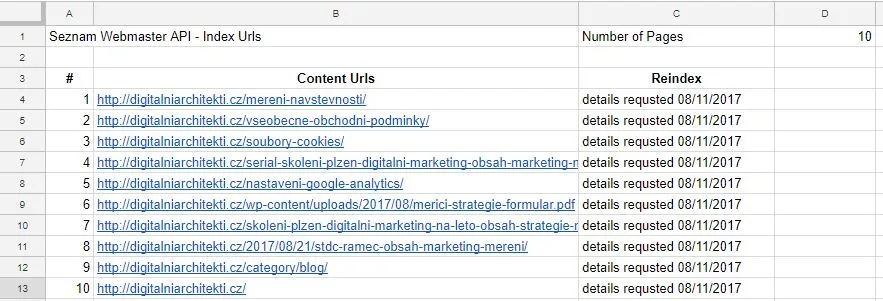
The output is lists of links in a Google Sheets table. See the screenshot showing one of the outputs for this website.
What Will You Need?
- A Google account with access to Google Docs
- Access to Seznam Webmaster
- A verified domain in Seznam Webmaster (at least 1 day in advance, it takes a while for the data to be published)
- Time, about 30 minutes, depending on your skill
How to Add a Website to Seznam Webmaster
1. Open the Seznam Webmaster address – https://reporter.seznam.cz/wm/web/prehled
2. In the drop-down on the left choose Add new website and authorise the website either by adding a meta tag or by using a txt file
3. Do not forget to add both the secure and the non-secure version; do not add the version with www and without www!
4. Then, under API – API key, prepare your API key. If you verified the website only now, it will take up to 24 hours for the data to propagate to the API
How to Transfer Data from the Seznam Webmaster API to Google Docs
1. Create a spreadsheet named, for example, domain.cz seznam webmaster. If you want to work with the index for both the secure and the non-secure version of the website, you need to create two documents. Alternatively, you can copy this template Google Docs Seznam Webmaster API template, which already contains the script
2. Prepare the structure of the spreadsheet; you need 6 sheets for the whole script to work correctly, including the correct naming
Create the first sheet named Index History; it will contain the whole history available through the API for your website. In the sheet then prepare the structure as in the screenshot. Here you can also check whether the individual further queries return the right values (whether the number of URLs matches).

The second sheet, named Error Urls, will contain addresses where Seznam Bot found an error. Currently, however, the type of errors cannot be determined. The structure is again in the screenshot.

The third sheet, named Index Urls, will contain addresses that are indexed by Seznam. The structure is again in the screenshot.

The fourth sheet, named Content Urls, will contain addresses that Seznam bot visited. The structure is again in the screenshot.

The fifth sheet, named Redirect Urls, will contain addresses that Seznam bot visited and where it found a redirect. The structure is again in the screenshot.

The sixth, named Url Details, will contain details about a specific page if you request them (see below). The structure is again in the screenshot.

3. Create a script attached to the document. In the menu bar choose Tools – Script editor. Create a new project named, for example, seznam webmaster. In the project create a new file named seznam.gs and put in it the code you can find here.
Then save the file; you will be asked to grant access to your Google account. Without granting access you unfortunately cannot continue. The permission covers access to documents and an external API endpoint.
4. In the code, at the beginning, edit the API_KEY variable and put in the API key assigned to you for the specific website. See Seznam Webmaster.
5. Then just save the script again and refresh the open spreadsheet.
6. After refreshing the open spreadsheet you should see the item Seznam Webmaster in the menu bar.
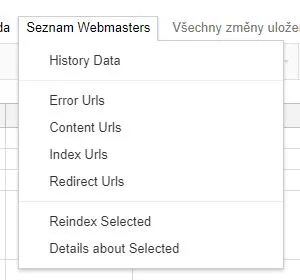
Content Urls were renamed Download Urls for easier identification.
In this drop-down menu you will find everything you need to operate the script. The items are explained below.
History Data – loads the historical development of the website in the index into the Index History sheet
Error Urls, Download Urls, Index Urls, Redirect Urls – load the respective links into new sheets with a timestamp according to the template
Reindex Selected – anywhere in the document select in a cell the link for which you want to request reindexing; it also works for selecting several links in a continuous selection. After the script runs, a message appears in the reindexing column
Details about Selected – anywhere in the document select in a cell the link for which you want to get details; the details Seznam has stored about the page are written to the Url Details sheet, mainly the title, description, keywords, link and og:graph data
Note: With these last two bulk queries watch out for the API limits, which at the time of writing are:
- at most 5 queries per second
- at most 100 queries per minute
- a request to force indexing of pages can be made at most 500 times a day
- for individual queries the API returns a maximum of 1000 URLs
7. Adjust the script to your needs. It is clear that the script is very simple, but it has potential for further extension. What is key for us is that we can already easily use this data in Google Data Studio in reports for our clients or for SEO specialists who work with them further.
Possible extensions that we may add over time are, for example:
– automatically created sheets according to the date of the query (done)
– script optimisation
– setting API limits and so on
Changelog
0.1 – 8 Nov 2017
- first version
0.2 – 14 Apr 2019
- added handling for when the API returns 0 URLs
- article edit
- document template
0.3 – 10 Nov 2019
- typos fixed
- generation of sheets with a timestamp
- chart added
- template edit
You can leave questions or your own modifications of the script in the comments.