

At the end of March 2019 Google released a new trigger (a rule of behaviour) for Google Tag Manager (GTM) called Trigger Group. Let us take a look at what it does.
This trigger brings nothing groundbreakingly new to GTM. I had expected it ever since I first learned about Google Tag Manager. Even so, it marks the direction Google is heading in and considerably simplifies the work of analysts who set up measurement, especially when it comes to programming knowledge and detailed knowledge of how the GTM ecosystem works.

What Is a Trigger Group?
As the name suggests, a Trigger Group lets you group several triggers into one “super” trigger. If all the triggers in this super trigger fire, the Trigger Group itself fires.
How to Use It?
For example, it solves relatively elegantly the very common situation of scrolling combined with time on page, for instance in the blog part of a website. In the past this situation had to be solved either by writing your own script or by using variables. The problem with scrolling is that if a user arrives on a page and immediately scrolls to the bottom, which visitors do quite often, all your scroll triggers fire at once. If you have other tags attached to them, for example Google Analytics Event tags, heaven forbid with an Interaction Event (which is generally bad practice: unless scrolling is tied to time, I always recommend sending it as a Non-Interaction Event, otherwise you significantly distort your Bounce Rate), that is a problem. This is exactly what Trigger Group now solves. I can link a scrolling trigger with, for example, a timer (e.g. 30 sec) and measure something we internally call Engagement.
With Trigger Group, all you need to do is create a time-on-page trigger (a timer, e.g. 30 sec), then a scrolling trigger, and put both of these triggers into the Trigger Group “super trigger”.
The following screenshot shows an example of my use.
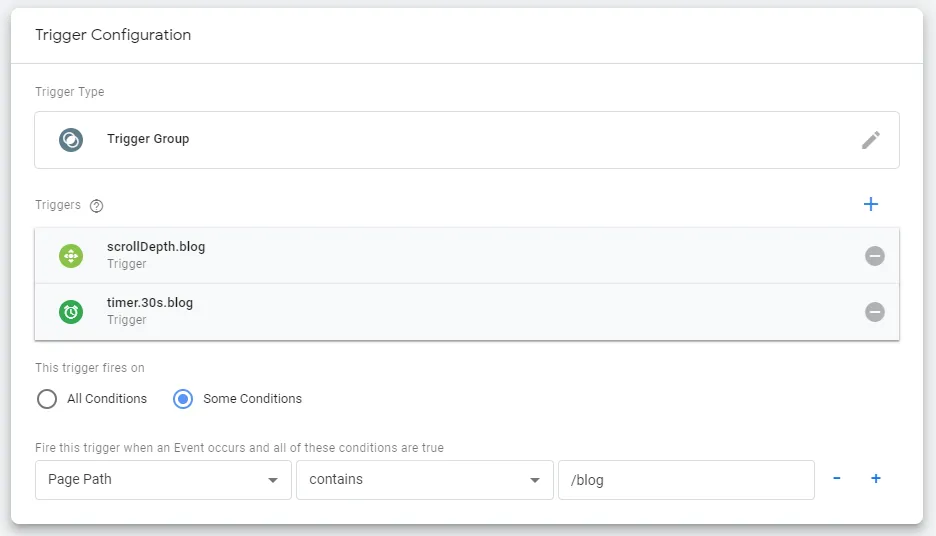
Another use can be, for example, replacing some counters and sending summary hits only after several activities, to save the Session Hit Limit. I will leave the rest to your imagination.
Are There Limitations of Trigger Group in GTM?
With the Trigger Group type, the order of the individual triggers you put into it does not matter. A slightly tricky point is that we can put the same trigger into a Trigger Group several times. In that case you have to fire that trigger as many times as you put it in.
Unfortunately, a Trigger Group cannot be reset for the time being and it applies only at the level of a single page. When you move to another page (subpage), the information about the fulfilment of some of the inserted triggers is not carried over and the trigger is reset.
I think this is the right direction and hopefully we will soon see complex trigger logic introduced (if, else, or, not), or a Trigger Group across several pages. For now this has to be solved, for example, through helper cookies, or on the server side.
I am already looking forward to the other features that will appear in GTM this year.