

Black Friday, Cyber Monday and Christmas are approaching, and with them the biggest sales opportunities of the year. You have your campaigns ready, budgets approved, discounts set. But how will you evaluate what really works? Are you making decisions based on accurate data, or just on estimates?
If you launch a campaign without being able to measure exactly what works, it is like shooting blindfolded. You may hit the target, but you will probably miss and lose a lot of money. The data layer is your sight, ensuring that every crown invested in campaigns brings the maximum result precisely in the period when minutes decide success.
Summary for Those Who Don’t Have Time to Read the Whole Article
- Implement the data layer at least 4 weeks before the event. Testing the data layer takes time, but it pays off.
- While tracking based on, for example, CSS selectors or code implementation captures perhaps 60–70% of conversions, with a data layer you get almost 100%.
- It enables real-time campaign optimisation thanks to instant and accurate data.
- It unifies data across all platforms. Google Ads, Meta and TikTok work with the same information.
- Under heavy website load it reduces tracking errors by 80%.
Do you want to have your data layer ready before Black Friday? Our team will help you with a complete data layer implementation, including integration with all marketing tools.
What a Data Layer Is and Why You Need It
The data layer is the central place where all data about customer behaviour on your website is collected. It works as a kind of translator. It takes the information that, for example, a customer added a product to the basket and sends it in the right format to Google Ads, Facebook, TikTok and other tools all at once.
During big events, when your website is visited by ten times the usual number of visitors, classic tracking scripts often fail or lose data. The data layer is designed precisely for these situations. It works reliably even under extreme load.
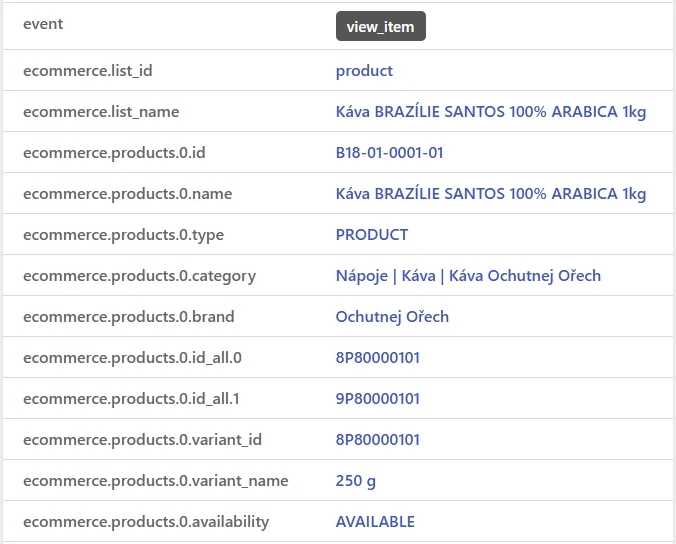
How It Works in Practice
During Black Friday a customer adds a product to the basket. The data layer immediately captures the product ID, price, category and quantity. It then passes this information in a structured form to Google Tag Manager, which distributes it to all your marketing tools. While ordinary scripts often fail during the peak, the data layer stores events locally and sends them gradually – no lost conversions, no holes in the data.
Why Implement a Data Layer Before Big Events
Timing is everything. Implementing a data layer right before Black Friday or Christmas shopping is a recipe for disaster. You need enough time for testing, debugging and optimisation, so that everything works perfectly exactly when you need it most.
Instant Optimisation in Real Time
During Black Friday the situation changes every hour. At 10:00 you launch a campaign for televisions. By 11:00, thanks to the data layer, you know that the conversion rate is half of what was expected, but laptops convert twice as well. You immediately move the budget and save the whole day. Without a data layer you would find out only in the evening (if at all).
Unified Data for All Platforms
Google Ads, Facebook, TikTok – every platform has its own specific data requirements. The data layer ensures that all of them work with the same information. Your remarketing audience on Facebook corresponds exactly to what you see in Google Ads, and the algorithms of all platforms receive quality data for optimisation.
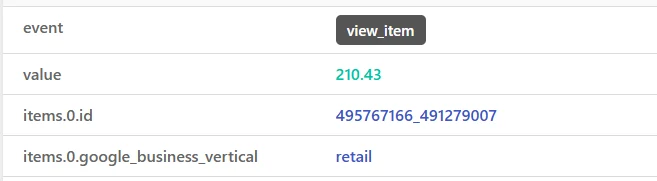
An Example from Practice
A Czech fashion e-shop implemented a data layer 6 weeks before Black Friday 2023. While in 2022 they captured only 65% of transactions correctly, in 2023 with the data layer they had 99.8% accuracy. That meant a 40% better ROAS (return on ad spend) across all campaigns.
You might also be interested in: 6 tips for working effectively with data in your company and not being afraid of it
Implementation Timeline
You need a minimum of 4 to 6 weeks for the complete deployment and testing of the data layer:
- 6 weeks before the event – Project kick-off, audit of the current state,
- 5 weeks before the event – Technical implementation,
- 4 weeks before the event – Testing and integration with Google Tag Manager,
- 3 weeks before the event – Connection to marketing tools,
- 2 weeks before the event – Complete testing under load,
- 1 week before the event – Final check and monitoring.
Which Events You Must Track
For an e-shop it is essential to capture:
- Product list view – E.g. a product category view or products shown in up-selling
- Product view – Which products customers browse most often,
- Add to basket – What really arouses an intent to buy,
- Basket abandonment – Where and why customers leave,
- Checkout start – At what step customers move on to payment. Plus further checkout steps according to the structure of the purchase journey.
- Purchase completion – The final conversion with details.
Every event must contain complete product data, including ID, price, category, variant and other data depending on the event type – transaction number, tax, shipping price, etc.
Do you need help implementing a data layer? Write to us.
Conclusion
During Black Friday and Christmas campaigns, success is decided by accurate data. With a data layer you see in real time what works and what doesn’t, and you can react immediately. Without it you rely on incomplete information and lose money.
Implementation takes 4 to 6 weeks, but the investment pays off with the very first big event. If you want to be ready for the next season, start preparing no later than a month and a half before the campaigns start.
Frequently Asked Questions
How long does implementing a data layer take?
A complete implementation including testing takes 4–6 weeks. A basic data layer can be deployed in 2 weeks, but for big events we recommend a longer time frame because of thorough testing.
Can a data layer handle high load?
Yes. Unlike individual tracking scripts, the data layer stores events locally and sends them gradually. It can process thousands of events per second without losing data.
Which events are the most important?
The priorities are: product view, add to basket, checkout start and purchase completion. Also track removal from the basket, the use of discount codes and category views.
Does it work with all marketing tools?
Yes, the data layer works with any tool integrated in Google Tag Manager – Google Ads, Meta Business, TikTok, Pinterest, LinkedIn and dozens more.
Sources
Google Developers. (2024). Data Layer Implementation Guide. Google Tag Manager Documentation. https://developers.google.com/tag-platform/tag-manager/datalayer
W3C. (2023). Customer Experience Digital Data Layer 1.0 Specification. World Wide Web Consortium. https://www.w3.org/2013/12/ceddl-201312.pdf